How to show colour variants on your product listings
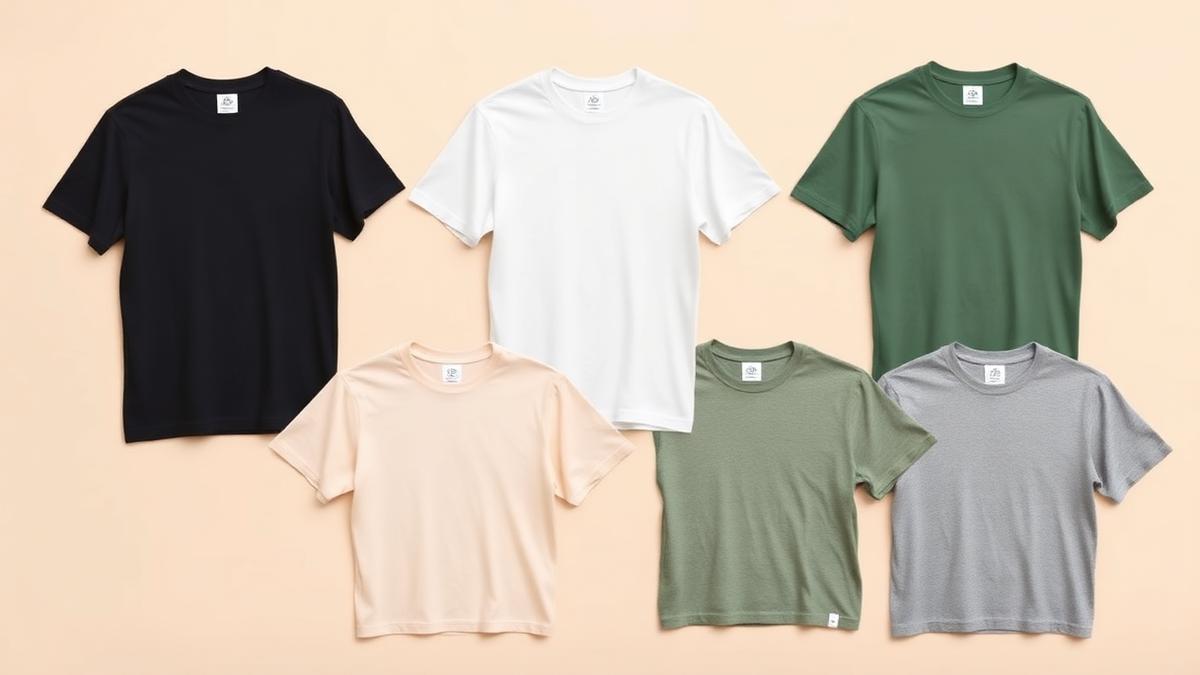
The short answer: show every colour you sell, in the listing images, not just in a dropdown. The two proven formats are per-variant images (one photo per colour, linked to the variant selector) and a colour variant grid (one image showing the same product in all colours side by side). You do not need to photograph each colour: start from one clean product image, recolour it digitally, and compose the grid. Buyers who can see their colour before clicking buy return fewer items and convert more often.
A buyer deciding between your listing and the next one is usually answering one question: "does it come in the colour I want, and what does that actually look like?" If your listing answers it visually, you win the click. If it answers it with a text dropdown, you are asking the buyer to imagine, and buyers do not buy what they have to imagine.
Why showing every colour matters
- Conversion: the variant a buyer wants is the one that sells them. A black-shirt buyer scrolling past a white-shirt hero shot may never click at all.
- Fewer returns: "the colour was not what I expected" is one of the most common return reasons in apparel. A real image per colour sets the expectation correctly.
- Search coverage: on marketplaces, variant images can surface for colour-specific searches ("sage green tote bag"), which a single hero shot never catches.
- Professional feel: a tidy variant display signals an established shop, and buyers trust established shops.
The two formats that work
1. Per-variant images
Each colour option has its own product image, wired to the variant selector, so choosing "navy" swaps the photo to navy. Marketplaces support this natively: Etsy through variation photos, Amazon through child ASIN images, Shopify through variant images. This is the baseline, do this first.
2. The colour variant grid
One image showing the same product repeated in every colour, laid out in a clean grid. It works as a secondary listing image and answers the whole colour question at a single glance. It is also the image that stops the "do you have this in pink?" messages, because the answer is visible.
The strongest listings use both: per-variant images wired to the selector, plus one grid image in the gallery showing the full range.
How to make variant images without reshooting
Photographing every colour is expensive and slow, and for print on demand it is usually impossible, because the coloured blanks do not exist until someone orders them. The digital route:
- Start from one clean product image, your best render or photo.
- Recolour the product digitally. Good tooling recolours the product surface while keeping your printed design exactly as it is, which is the part generic photo editors get wrong.
- Compose the grid. Same size, same angle, even spacing, consistent background, so the grid reads as one professional image.
Our free Colour Variant Grid tool does steps two and three in one pass: upload one product image, pick your colours, and download a listing-ready grid. For per-variant images, our mockup library renders your design onto the same template in each colourway, so every variant gets a matching photo from one upload.
Tips for a grid that converts
- Keep the design identical in every cell. The only thing changing should be the colour. Consistency is what makes the grid look trustworthy.
- Order the colours deliberately, best sellers first, light to dark reads well.
- Label the colours if your buyers order by name ("Heather Grey", "Sand"), especially where the marketplace variant names must match.
- Match your listing's aspect ratio, square for Etsy and Amazon secondary slots (the full size guidance is in our product image size guide).
- Do not overcrowd. Above roughly 12 colours, split into two grids or show the top sellers plus a "more colours available" note.
Frequently asked questions
How do I show colour options on Etsy? Use variation photos so each colour choice swaps the image, and add one colour grid image to the listing gallery showing the full range at a glance. Both together answer the colour question before the buyer has to ask.
Do I need to photograph each colour variant? No. Start from one clean image and recolour it digitally, keeping the printed design unchanged. For print on demand this is the standard approach, since coloured blanks are printed only after an order.
What is a colour variant grid? One image showing the same product in every colour you offer, arranged in an even grid. It is used as a secondary listing image so buyers see the whole range at once.
Does showing more colours really increase sales? Showing the colours buyers actually want, visually, converts better than making them imagine from a dropdown, and it reduces colour-related returns. The variant a buyer wants is the one that sells them.