Lifestyle Product Photography Without a Photographer: How POD Sellers Do It Now
For most of the years we've sold print on demand, lifestyle photography had a price list. A photographer, a model, a location, half a day, and somewhere between a few hundred and a couple thousand euros, per session, per product line. Which is why most small sellers never did it, and why the sellers who did stood out so much.
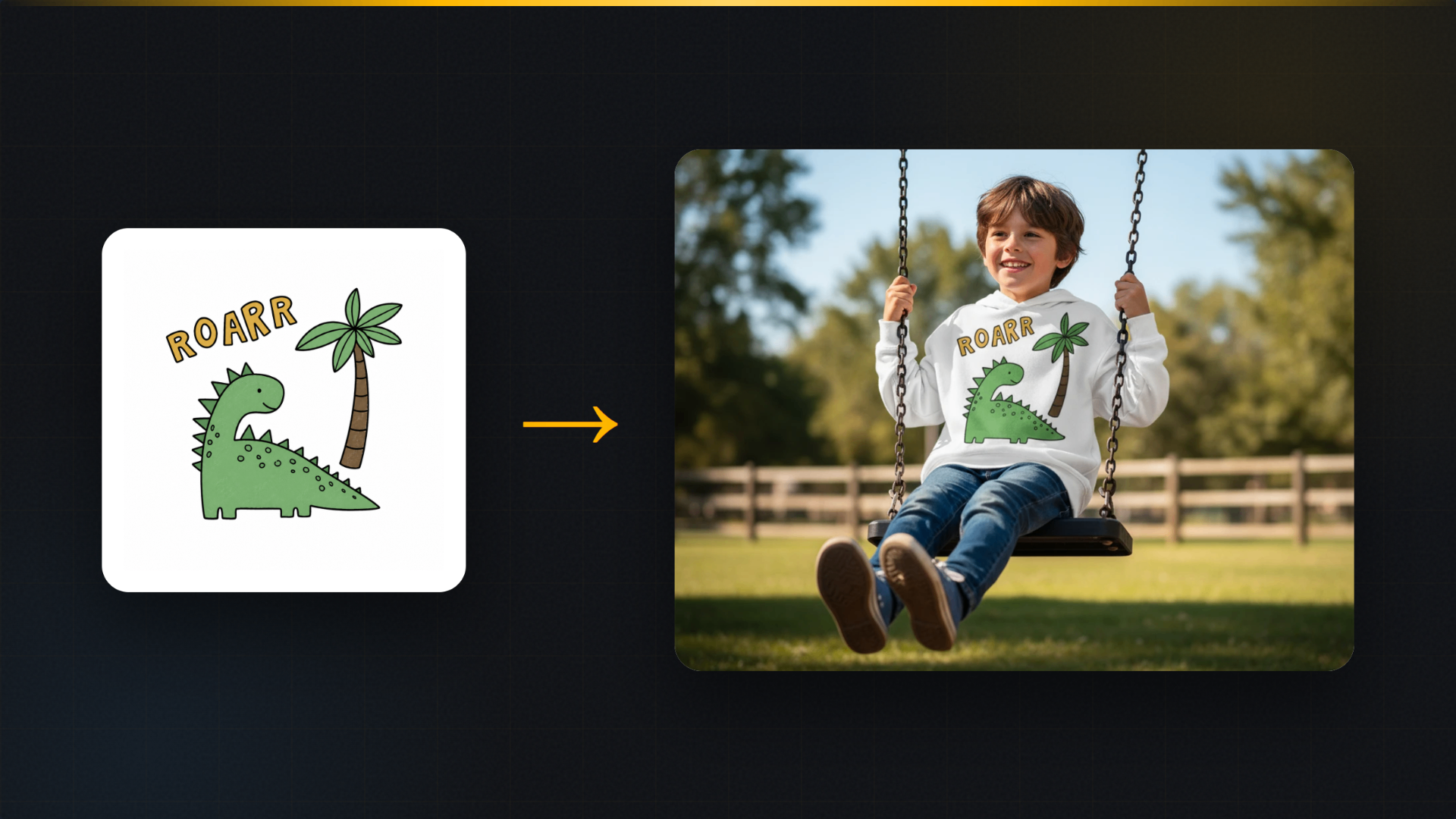
We remember the first time we put a hoodie design on an actual child on an actual swing without any of that. A flat mockup went in; a photo came out of a kid mid-laugh in a park, hoodie catching the light, design perfectly in place. It took under a minute. The strange feeling wasn't that it worked. It was realizing the moat that lifestyle photography used to be had just drained.
Here's how the method works, what it's genuinely good at, where it still loses to a real camera, and how to stay on the right side of marketplace rules while using it.
Why lifestyle images are worth the trouble at all
Quick grounding, because this drives everything else. A flat product image answers "what is it". A lifestyle image answers "what will my life look like with it", and buyers pay for the second question. We've published our own numbers on this in lifestyle versus flat mockups; the short version is that context lifts conversion by a wide margin, and it especially lifts products that are gifts, since gift buyers are imagining someone else's reaction.
So the question was never whether to have lifestyle images. It was whether you could afford them. That's the part that changed.
How AI lifestyle placement actually works
The tool we built for this is called Product Placement. You give it your product, rendered or photographed, and describe the scene: a person wearing the shirt at a market, a mug on a cafe table by a window, a tote over a shoulder on a street. The AI blends your product into that scene, and unlike simple background swapping, it can move, resize and re-angle the product so it sits naturally in the composition. A shirt drapes on a body. A mug sits at the right perspective on the table.
That re-angling is the honest technical difference from the background tools we covered in our backgrounds guide. Product Staging keeps your product literally pixel-identical and paints the world behind it. Product Placement adjusts the product to fit the scene, which is what an on-model shot requires. Your printed design stays your design in both; what changes in Placement is pose and perspective, the way it would if a real person put the shirt on.
Knowing which tool you're using matters, and we say so directly in the app, because a seller should always know whether their product pixels were adjusted.
What it's genuinely good at
On-model apparel shots. The killer use case. Shirts, hoodies and totes need bodies, and bodies were always the expensive part. One design can go from flat file to worn-in-the-world in about a minute.
Scenes you could never book. Golden-hour beach, snowy street, festival crowd. A photographer charges real money for each of these. A described scene costs a click.
Consistency across a catalog. Forty designs shot by a photographer over months drift in style. Forty designs placed into the same scene family look like one brand. Buyers read that consistency as professionalism.
Speed to seasonal. Your bestseller in a cozy winter scene, live the same afternoon you thought of it.
Where a real camera still wins
We'd rather you hear the limits from us.
Extreme close-up texture. Stitching, embroidery, foil, heavy knits. AI renders fabric plausibly at normal viewing distance; a macro lens on the real product is still the truth-teller for texture-first products.
Your actual production quality. An AI image shows the design; only a photo of the shipped product proves your printer's output. We keep one real photo in every listing for exactly this reason, and we suggest you do too.
Highly specific real people. If your brand is built on a recognizable founder or a specific community, generated models can't replace them. Placement gives you a person; it doesn't give you your person.
Keeping it honest with marketplaces
The rule that keeps you safe on every platform is the one Etsy's guidance keeps circling: the product must be real, the image must be accurate, the buyer must not be misled. In practice for POD sellers:
- Start from your actual product and actual design, never from "generate me a mug that looks nice".
- The design in the lifestyle image must be the design that ships. This is why we're strict about artwork fidelity across all our tools.
- Use lifestyle shots in secondary slots, keep your main image compliant per the marketplace rules, and keep at least one true photo of the physical product in the set.
Do those three things and AI lifestyle imagery isn't a gray zone. It's just photography with the logistics removed.
A starter workflow: one product, four lifestyle shots, fifteen minutes
- Pick your bestseller, since lifestyle images lift proven products hardest.
- Generate one on-model shot in a scene your buyer recognizes from their own life.
- Generate one product-in-place shot, no person, just the product where it lives.
- Generate one seasonal variant of whichever came out stronger.
- Zoom to 100% on the design in each, the same thirty-second check we preach everywhere.
- Slot them into positions two through four of the listing, behind your compliant main image.
The free plan includes the AI tools and 10 renders a month, which covers this whole exercise for your first product with room to spare.
FAQ
Do buyers accept AI lifestyle photos? Buyers accept accurate images. What they punish is inaccuracy, wherever it comes from. A generated scene showing the real product and real design converts like photography, because functionally that's what it is.
Can I show apparel on a model without hiring anyone? Yes, that's Product Placement's main job. The product is adjusted to drape and sit naturally on a generated model; the printed design stays exactly yours.
Is this allowed on Etsy? Etsy's guidance centers on accuracy: real product, truthful image. AI-assisted secondary images that accurately show your product are standard practice; inventing products that don't exist is the line you don't cross.
What does a lifestyle shot cost this way? On our platform, AI tool runs draw from your plan's monthly AI assists, and the free tier includes enough to build your first listings without paying. Compare that with the day rate you last saw on a photography quote.
MockItReal turns one design into every image your store needs, including on-model and in-scene lifestyle shots, with your artwork untouched. Free plan: 10 mockups a month, no watermark, no card. Start free.