AI Product Photo Backgrounds: The One Question to Ask Before You Trust Any Tool
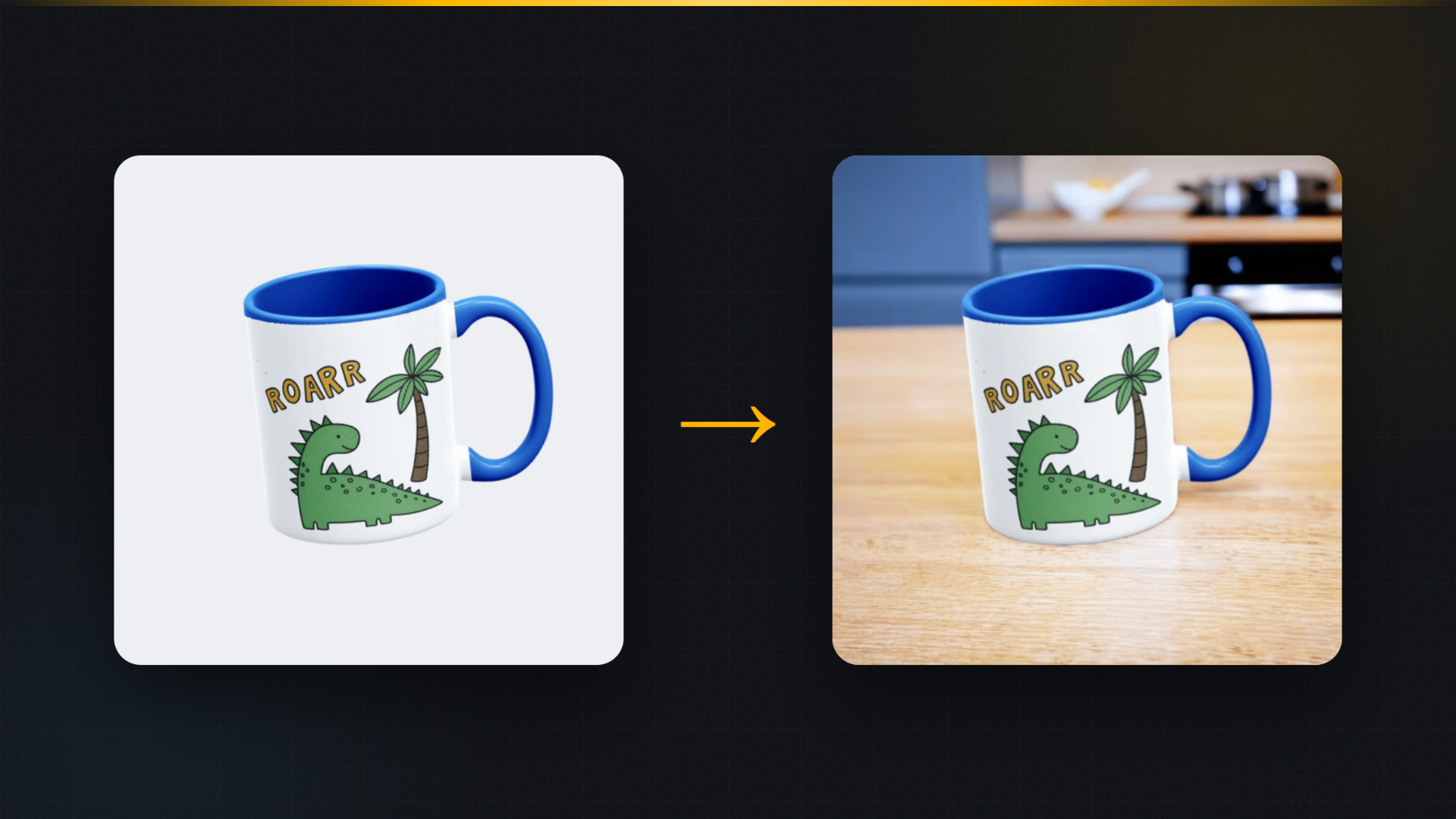
There's a test we run on every AI background tool that crosses our desk, and it takes thirty seconds. Upload a mug with text on it. Generate a new background. Zoom in on the text.
About half the time, the text has changed. A letter thickened, a curve smoothed, the whole print subtly redrawn by a model that was asked to change the background and decided to "improve" the product while it was in there. For a photographer's coffee cup, who cares. For a seller whose buyer will receive the actual printed product, that image is now a small lie. The listing shows artwork that doesn't exist.
We've sold print on demand for over ten years, and this is the thing we'd tell any seller shopping for an AI background tool: the background is the easy part. The question is what happens to your product.
What AI background generation actually does
The good tools all work roughly the same way. The product is separated from its original background, the model generates a new scene behind it, and lighting is blended so the product doesn't look pasted on. Done well, a flat render of your mug becomes the same mug on a kitchen counter with morning light, in seconds, for pennies.
Done badly, one of two things happens. Either the blend is lazy and the product floats with a halo like a 2009 forum signature. Or, worse and more common lately, the model regenerates the whole image, product included. The scene looks fantastic. The product is no longer yours.
That second failure is sneaky because it often looks better at a glance. Regenerated products have perfect studio sheen. It's only your logo, your text, your specific artwork that got sacrificed, and you only notice when you look closely, or when a customer does.
How we handle it, and why the rule is absolute
In MockItReal, background generation is a tool we call Product Staging, and it operates under one non-negotiable rule: the scene is AI, your product is not. The tool keeps your product exactly in place, pixels untouched, and generates a fresh background behind it. Lighting and shadows adapt around the product; the product itself, and above all the printed design on it, stays exactly as printed.
This isn't a stylistic preference. For a POD seller it's a legal and refund question. Your listing image is a promise about what ships. An AI that redraws your artwork is writing checks your printer can't cash, and "the picture looked a bit different" is one of the most common refund reasons in our category.
There's a companion tool, Restyle & Relight, for when you deliberately want to change the mood: same product, warmer light, moodier atmosphere, different material finish. Even there, the design layer is off limits. Mood changes, artwork doesn't.
When to use which background
After a decade of listings, here's our honest playbook by image slot:
Marketplace main image: pure white, no scene at all. This is a compliance question, not a creative one, and we covered it in detail in our Amazon requirements guide.
Second and third images: this is where AI scenes earn their keep. A mug on a real-looking counter, a tote against a linen backdrop. Context sells the feeling, and our own conversion data shows lifestyle images lifting sales meaningfully over flat ones.
Seasonal refreshes: the underrated use. The same bestseller staged onto an autumn scene in September and a bright summer scene in June takes minutes and makes a store look alive. Sellers reshoot for seasons; you can re-stage instead.
When to skip AI scenes entirely: if your product's appeal is texture up close (embroidery, foil, heavy fabric), a clean close-up photo will beat any generated scene. AI backgrounds are a context tool, not a detail tool.
A practical workflow for one product
- Start from your mockup render or a decent photo. Sharp source in, sharp result out.
- Run Product Staging with a scene that matches where the product lives in real life. A kitchen for a mug, a desk for a print, a doorway for a tote. Buyers trust plausible scenes and quietly distrust fantasy ones.
- Zoom to 100% on your design. Every time, every tool, including ours. Thirty seconds of checking is the whole quality control.
- Generate one alternative scene, pick the better, resist generating fifteen. Choice paralysis is real and the second-best scene was almost always good enough.
- Save both to your library so seasonal swaps later start from the same source.
On the free plan the AI tools are included, not paywalled, so you can run this exact test, text-on-mug and all, before believing a word we've said.
FAQ
Will an AI background change my product's colors? A well-built tool won't touch the product at all; lighting blend can subtly affect perceived color at the edges, which is normal in real photography too. If the product's base color visibly shifts, the tool is regenerating your product. Stop using it.
Are AI-staged photos allowed on Etsy and Amazon? Staged secondary images are standard practice. The working rule across marketplaces: the product must be real and the image must accurately show what the buyer receives. Change the scene freely; never let a tool change the product.
Do AI backgrounds look fake? Bad ones do, usually from lighting mismatch. Pick scenes with soft, plausible light and check that shadows fall in one direction. If your eye says something's off, a buyer's will too.
Can I use a phone photo as the source? Yes, and it's one of the best use cases: a decent phone shot plus a generated scene beats a bad phone shot in your kitchen every time. Sharpness of the source is the only real requirement.
MockItReal turns one design into every image your store needs. The AI builds scenes around your product and never touches your artwork. Free plan: 10 mockups a month, no watermark, no card. Start free.