Amazon Product Image Requirements in 2026: What POD Sellers Get Wrong (and the One-Click Fix)
A seller we worked with had a bestselling mug design. Forty orders a month on Etsy, steady as clockwork. So she expanded to Amazon, uploaded her listings on a Sunday evening, and by Wednesday half of them were suppressed. Not banned, not rejected with a helpful explanation. Just quietly invisible.
The reason, when she finally dug it out of Seller Central: her main images had an off-white background. Not white. Off-white. A difference she couldn't even see on her laptop screen.
We've been selling print on demand for over ten years, and this exact story repeats every week somewhere. So here's the guide we wish someone had handed us: what Amazon actually requires from your product images in 2026, which rules trip up POD sellers specifically, and how to fix a failing image in one click instead of one weekend.
The main image rules, in plain language
Amazon's requirements for the main image (the one buyers see in search results) haven't gotten looser over the years. If anything, enforcement got stricter, because automated image checks now catch what human reviewers used to miss.
Pure white background, and they mean it. The background must be RGB 255, 255, 255. Not light grey at 240, 240, 240. Not the slightly warm white at 250, 250, 250 that most mockup photos have. Not transparent. Amazon's checker reads pixel values, and "looks white to me" is not a pixel value.
The fastest fix is our free Amazon white background tool, and the short version of the rule is in our white background guide.
The product fills the frame. Your product should occupy 85% or more of the image. POD sellers fail this one constantly, because mockup photos are usually composed with breathing room around the product. Pretty for Etsy, suppressed on Amazon.
Minimum 1,000 pixels on the longest side. That's the floor for the zoom function to work, and zoom matters because buyers who zoom convert better. Realistically you want 2,000 pixels or more. If you're pulling 1080px images from a social media export, you're already borderline.
Nothing else in the frame. No text, no logos, no watermarks, no badges saying "bestseller", no inset detail shots. Just the product.
What actually happens if you break the rules: suppression. Your listing stays technically live but stops appearing in search. You don't get an email. You just get silence, and if you're not checking your account health regularly, silence can last weeks while your sales sit at zero.
Why this hits print-on-demand sellers harder than everyone else
A regular brand photographs its product once and reuses the shot for years. A POD seller publishes new designs constantly, and each one needs a compliant main image. If your workflow for making a white-background image takes 20 minutes in an editing tool, then ten new designs cost you three hours of the most boring work in ecommerce.
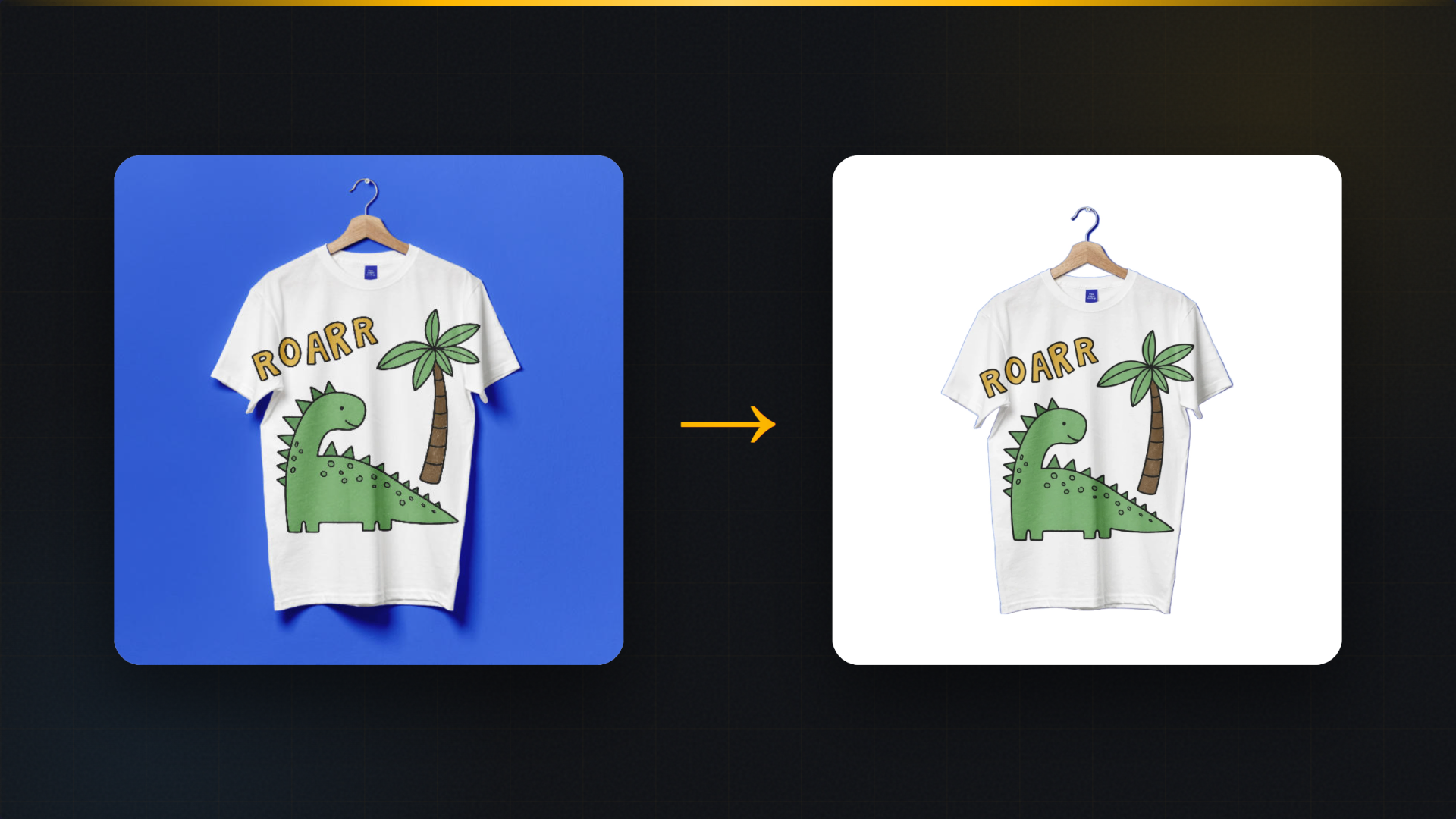
There's a second trap that's specific to our world. Most POD mockup photos are lifestyle-styled by default: the mug on a wooden table, the shirt on a hanger against a colored wall. Those images sell well, and Amazon happily accepts them as secondary images. But none of them can be your main image, so the one image you need most is the one your mockup library is least likely to give you.
And the third trap: cutting out a product by hand. If you've ever traced a mug handle with a selection tool at 2am, you know why so many main images have those telltale ragged halos. Amazon's checker sees them too.
The one-click version
This is the part where we tell you what we built, so take it with the obvious grain of salt, but also: this is exactly why we built it.
MockItReal has a tool called Marketplace White. You give it any product image, a mockup render or even a phone photo, and it returns your product centered on a genuinely pure white background, edges clean, with an optional soft contact shadow so the product doesn't look like it's floating. One click, done in seconds, saved to your library.
The contact shadow deserves a sentence, because sellers ask about it. Amazon allows natural product shadows on the main image. What it doesn't allow is decoration. A soft shadow under a mug reads as natural and keeps the image from looking flat, so we generate one that stays on the right side of that line.
For the frame-fill rule, the tool centers and scales the product for you. And because everything renders at high resolution, the 1,000-pixel minimum stops being something you think about.
If you want to check it against your own products, the free plan includes 10 renders a month with no watermark, which for most sellers covers a full product launch. Run your current main images through it and compare.
A quick self-audit for your existing listings
Before you fix anything, find out what's actually broken. This takes ten minutes:
- Open your worst-performing Amazon listing and download the main image.
- Open it in any editor and check the background color value in a corner. If it's not exactly 255, 255, 255, that's your first fix.
- Eyeball the frame fill. If there's more background than product, that's your second.
- Check the pixel dimensions. Under 1,000 on the long side means no zoom, and under 2,000 means you're leaving sharpness behind.
- Look at the edges of your product at 200% zoom. Halos and jagged cutout lines are what automated checks flag even when everything else passes.
In our experience, most suppressed POD listings fail on the background value or the frame fill, and both are one-click fixes now.
What about the other nine image slots?
The main image gets you found. The secondary images get you bought. Amazon gives you room for lifestyle scenes, size references, detail crops and variant shots, and sellers who fill those slots convert measurably better than sellers who upload one image and hope.
That's a topic of its own, and we've covered pieces of it in our image size guide and our data piece on lifestyle versus flat images. The short version: make the main image compliant, then spend your remaining effort on slots two through seven.
FAQ
Does Amazon really check the exact RGB value? Yes. Automated checks read pixel values, and 250, 250, 250 fails even though your eye can't tell the difference. When in doubt, sample the corner pixels of your image before uploading.
Can my main image be a mockup instead of a photo? Amazon requires the main image to show the actual product. A high-quality render of your product on pure white is standard practice across POD, and what matters in review is that the image accurately represents what the buyer receives.
My listing got suppressed. How fast can I fix it? Replace the main image with a compliant one and the listing typically returns to search within a day or two. The fix itself takes minutes; the waiting is Amazon's side.
Do I need white backgrounds on Etsy too? Etsy doesn't require them, and lifestyle images usually convert better there. But a clean white shot is still worth having in every listing, because it's the image buyers trust for "what am I actually getting".
MockItReal turns one design into every image your store needs: mockups, AI product photos, marketplace-ready white shots and every size. The free plan is 10 mockups a month, no watermark, no card. Start free.